Windows 차단 네트워크 트래픽 가져오기
Categories:
- Windows 차단 네트워크 트래픽 가져오기
Windows 차단 네트워크 트래픽 가져오기
- 차단된 트래픽을 식별해야 하며, 차단된 트래픽에는 송신 및 수신 방향이 포함됩니다.
- 차단에는 두 가지 형태가 있습니다. 연결(connection) 기반과 데이터 패킷(packet) 기반입니다. 데이터 패킷의 버림은 비교적 자주 발생하며 흔히 볼 수 있습니다. 버림 원인을 검토해야 하며, 연결 기반 차단이 실제 차단 시나리오에 더 부합합니다.
- 많은 정상 처리된 패킷도 버려지므로 drop과 block 행동을 구분해야 합니다. 주로 block 상황에 주목해야 합니다.
테스트 환경 구축
WFP는 주로 usermode에서 작동하며 일부는 kernelmode에서 작동하며, 그 기능은 드라이버 형태로 나타납니다. 테스트 환경을 구축하는 방법은 복잡합니다. 권장 방법은 테스트 머신을 별도의 물리 머신으로 사용하고 개발 머신에서 컴파일한 후 원격 디버깅을 위해 테스트 머신으로 전송하는 것입니다. 조건 제한으로 인해 로컬에서 직접 디버깅할 수도 있습니다.
- Microsoft WFP Sample 프로젝트
- Windows-driver-samples\network\trans\WFPSampler만 주목합니다.
- WFPSampler 프로젝트 가이드
컴파일 문제:
기타 문제:
감사로 block 이벤트 가져오기
기본적으로 WFP에 대한 감사는 비활성화되어 있습니다.
- 그룹 정책 개체 편집기 MMC 관리 단위, 로컬 보안 정책 MMC 관리 단위 또는 auditpol.exe 명령을 통해 범주(category)별로 감사를 활성화할 수 있습니다.
- auditpol.exe 명령을 통해 하위 범주(subcategory)별로 감사를 활성화할 수 있습니다.
- GUID를 사용하여 설정해야 하며, 그렇지 않으면 다른 언어 시스템에서 로컬화 문제가 발생합니다.
- 감사에 순환 로그를 사용하며, 128KB로 리소스 소비를 걱정할 필요가 없습니다.
카테고리 https://docs.microsoft.com/en-us/windows/win32/secauthz/auditing-constants
| Category/Subcategory | GUID |
|---|---|
| … | … |
| Object Access | {6997984A-797A-11D9-BED3-505054503030} |
| Policy Change | {6997984D-797A-11D9-BED3-505054503030} |
| … | … |
Object Access 서브카테고리와 대응 GUID https://docs.microsoft.com/en-us/openspecs/windows_protocols/ms-gpac/77878370-0712-47cd-997d-b07053429f6d
| Object Access Subcategory | Subcategory GUID | Inclusion Setting |
|---|---|---|
| … | … | … |
| Filtering Platform Packet Drop | {0CCE9225-69AE-11D9-BED3-505054503030} | No Auditing |
| Filtering Platform Connection | {0CCE9226-69AE-11D9-BED3-505054503030} | No Auditing |
| Other Object Access Events | {0CCE9227-69AE-11D9-BED3-505054503030} | No Auditing |
| … | … | … |
Policy Change 서브카테고리와 대응 GUID:
| Policy Change Subcategory | Subcategory GUID |
|---|---|
| Audit Policy Change | {0CCE922F-69AE-11D9-BED3-505054503030} |
| Authentication Policy Change | {0CCE9230-69AE-11D9-BED3-505054503030} |
| Authorization Policy Change | {0CCE9231-69AE-11D9-BED3-505054503030} |
| MPSSVC Rule-Level Policy Change | {0CCE9232-69AE-11D9-BED3-505054503030} |
| Filtering Platform Policy Change | {0CCE9233-69AE-11D9-BED3-505054503030} |
| Other Policy Change Events | {0CCE9234-69AE-11D9-BED3-505054503030} |
# auditpol 매뉴얼 참조: https://docs.microsoft.com/en-us/windows-server/administration/windows-commands/auditpol
# 이 섹션은 주로 'Object Access' 범주에 주목합니다.
# 쿼리 가능한 필드 가져오기
# -v는 GUID를 표시하고, -r은 csv 보고서를 표시합니다.
auditpol /list /category /v
auditpol /list /subcategory:* /v
# 특정 서브카테고리의 감사 설정 가져오기
auditpol /get /category:'Object Access' /r | ConvertFrom-Csv| Get-Member
# GUID 조회
auditpol /get /category:'Object Access' /r | ConvertFrom-Csv| Format-Table Subcategory,'Subcategory GUID','Inclusion Setting'
# 서브카테고리 찾기
auditpol /list /subcategory:"Object Access","Policy Change" -v
# 백업
auditpol /backup /file:d:\audit.bak
# 복원
auditpol /restore /file:d:\audit.bak
# 정책 수정
# **Policy Change**    | {6997984D-797A-11D9-BED3-505054503030}
auditpol /set /category:"{6997984D-797A-11D9-BED3-505054503030}" /success:disable /failure:disable
# Filtering Platform Policy Change | {0CCE9233-69AE-11D9-BED3-505054503030}
auditpol /set /subcategory:"{0CCE9233-69AE-11D9-BED3-505054503030}" /success:enable /failure:enable

# **Object Access**    | {6997984A-797A-11D9-BED3-505054503030}
auditpol /get /category:"{6997984A-797A-11D9-BED3-505054503030}"
auditpol /set /category:"{6997984A-797A-11D9-BED3-505054503030}" /success:disable /failure:disable
# Filtering Platform Packet Drop | {0CCE9225-69AE-11D9-BED3-505054503030}
auditpol /set /subcategory:"{0CCE9225-69AE-11D9-BED3-505054503030}" /success:disable /failure:enable
# Filtering Platform Connection  | {0CCE9226-69AE-11D9-BED3-505054503030}
auditpol /set /subcategory:"{0CCE9226-69AE-11D9-BED3-505054503030}" /success:disable /failure:enable
# 로그 읽기
$Events = Get-WinEvent -LogName 'Security'
foreach ($event in $Events) {
    ForEach ($line in $($event.Message -split "`r`n")) {
        Write-host $event.RecordId ':' $Line
        break
    }
}
이벤트 설명:
| Event ID | Explanation |
|---|---|
| 5031(F) | The Windows Firewall Service blocked an application from accepting incoming connections on the network. |
| 5150(-) | The Windows Filtering Platform blocked a packet. |
| 5151(-) | A more restrictive Windows Filtering Platform filter has blocked a packet. |
| 5152(F) | The Windows Filtering Platform blocked a packet. |
| 5153(S) | A more restrictive Windows Filtering Platform filter has blocked a packet. |
| 5154(S) | The Windows Filtering Platform has permitted an application or service to listen on a port for incoming connections. |
| 5155(F) | The Windows Filtering Platform has blocked an application or service from listening on a port for incoming connections. |
| 5156(S) | The Windows Filtering Platform has permitted a connection. |
| 5157(F) | The Windows Filtering Platform has blocked a connection. |
| 5158(S) | The Windows Filtering Platform has permitted a bind to a local port. |
| 5159(F) | The Windows Filtering Platform has blocked a bind to a local port. |
관심 있는 이벤트 상세 설명:
- Audit Filtering Platform Packet Drop
-
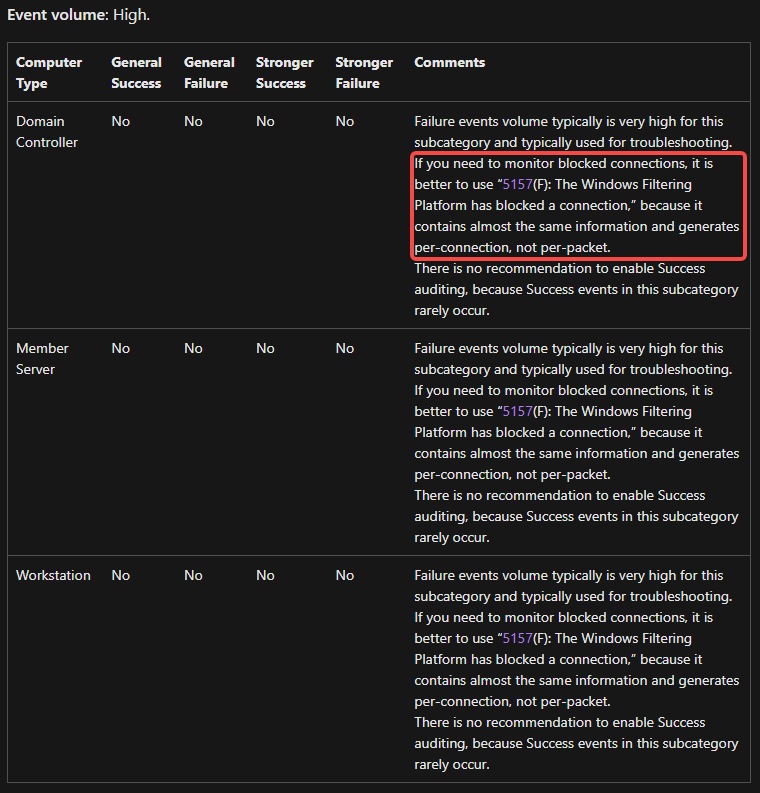
이 이벤트는 매우 빈번하게 발생하므로 5157 이벤트를 주목하는 것이 좋습니다. 거의 동일한 정보를 기록하지만 5157은 데이터 패킷이 아닌 연결 기반으로 기록됩니다.
-
Failure events volume typically is very high for this subcategory and typically used for troubleshooting. If you need to monitor blocked connections, it is better to use “5157(F): The Windows Filtering Platform has blocked a connection,” because it contains almost the same information and generates per-connection, not per-packet.
-
- Audit Filtering Platform Connection
- 실패 이벤트만 주목하는 것이 좋으며, 차단된 연결 등 필요에 따라 허용된 연결을 주목합니다.
- 5031
- If you don’t have any firewall rules (Allow or Deny) in Windows Firewall for specific applications, you will get this event from Windows Filtering Platform layer, because by default this layer is denying any incoming connections.
51505151- 5155
- 5157
- 5159
provider 정보 가져오기
# security 관련 provider 정보 가져오기
Get-WinEvent -ListProvider "*Security*"  | Select-Object providername,id
# Microsoft-Windows-Security-Auditing                             54849625-5478-4994-a5ba-3e3b0328c30d
# provider가 제공하는 task 정보 가져오기
Get-WinEvent -ListProvider "Microsoft-Windows-Security-Auditing"  | Select-Object -ExpandProperty tasks
# SE_ADT_OBJECTACCESS_FIREWALLCONNECTION       12810 Filtering Platform Connection          00000000-0000-0000-0000-000000000000
| ProviderName | Id |
|---|---|
| Security Account Manager | 00000000-0000-0000-0000-000000000000 |
| Security | 00000000-0000-0000-0000-000000000000 |
| SecurityCenter | 00000000-0000-0000-0000-000000000000 |
| Microsoft-Windows-Security-SPP-UX-GenuineCenter-Logging | fb829150-cd7d-44c3-af5b-711a3c31cedc |
| Microsoft-Windows-Security-Mitigations | fae10392-f0af-4ac0-b8ff-9f4d920c3cdf |
| Microsoft-Windows-VerifyHardwareSecurity | f3f53c76-b06d-4f15-b412-61164a0d2b73 |
| Microsoft-Windows-SecurityMitigationsBroker | ea8cd8a5-78ff-4418-b292-aadc6a7181df |
| Microsoft-Windows-Security-Adminless | ea216962-877b-5b73-f7c5-8aef5375959e |
| Microsoft-Windows-Security-Vault | e6c92fb8-89d7-4d1f-be46-d56e59804783 |
| Microsoft-Windows-Security-Netlogon | e5ba83f6-07d0-46b1-8bc7-7e669a1d31dc |
| Microsoft-Windows-Security-SPP | e23b33b0-c8c9-472c-a5f9-f2bdfea0f156 |
| Microsoft-Windows-Windows Firewall With Advanced Security | d1bc9aff-2abf-4d71-9146-ecb2a986eb85 |
| Microsoft-Windows-Security-SPP-UX-Notifications | c4efc9bb-2570-4821-8923-1bad317d2d4b |
| Microsoft-Windows-Security-SPP-UX-GC | bbbdd6a3-f35e-449b-a471-4d830c8eda1f |
| Microsoft-Windows-Security-Kerberos | 98e6cfcb-ee0a-41e0-a57b-622d4e1b30b1 |
| Microsoft-Windows-Security-ExchangeActiveSyncProvisioning | 9249d0d0-f034-402f-a29b-92fa8853d9f3 |
| Microsoft-Windows-NetworkSecurity | 7b702970-90bc-4584-8b20-c0799086ee5a |
| Microsoft-Windows-Security-SPP-UX | 6bdadc96-673e-468c-9f5b-f382f95b2832 |
| Microsoft-Windows-Security-Auditing | 54849625-5478-4994-a5ba-3e3b0328c30d |
| Microsoft-Windows-Security-LessPrivilegedAppContainer | 45eec9e5-4a1b-5446-7ad8-a4ab1313c437 |
| Microsoft-Windows-Security-UserConsentVerifier | 40783728-8921-45d0-b231-919037b4b4fd |
| Microsoft-Windows-Security-IdentityListener | 3c6c422b-019b-4f48-b67b-f79a3fa8b4ed |
| Microsoft-Windows-Security-EnterpriseData-FileRevocationManager | 2cd58181-0bb6-463e-828a-056ff837f966 |
| Microsoft-Windows-Security-Audit-Configuration-Client | 08466062-aed4-4834-8b04-cddb414504e5 |
| Microsoft-Windows-Security-IdentityStore | 00b7e1df-b469-4c69-9c41-53a6576e3dad |
block 이벤트 생성하기
block 이벤트를 생성할 때 다른 소프트웨어의 실행에 영향을 줄 수 있다는 점에 매우 주의해야 합니다!
필요 시 .\WFPSampler.exe -clean을 사용하여 필터를 정리할 수 있습니다.
실행 단계:
-
Filtering Platform Connection 감사 스위치를 켭니다.
auditpol /set /subcategory:"{0CCE9226-69AE-11D9-BED3-505054503030}" /success:enable /failure:enable -
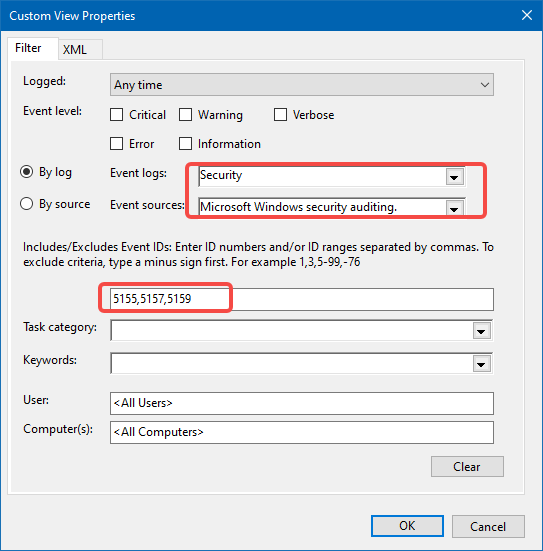
Event Viewer를 열고 Custom View를 생성하고 필터를 만듭니다. 잠시 동안 5155, 5157, 5159 세 개의 이벤트만 주목합니다.
-
필터를 생성합니다. WFPSampler.exe를 사용하여 필터를 생성하고 로컬의 80 포트에 대한 수신을 차단합니다.
.\WFPSampler.exe -s BASIC_ACTION_BLOCK -l FWPM_LAYER_ALE_AUTH_LISTEN_V4 -iplp 80 -
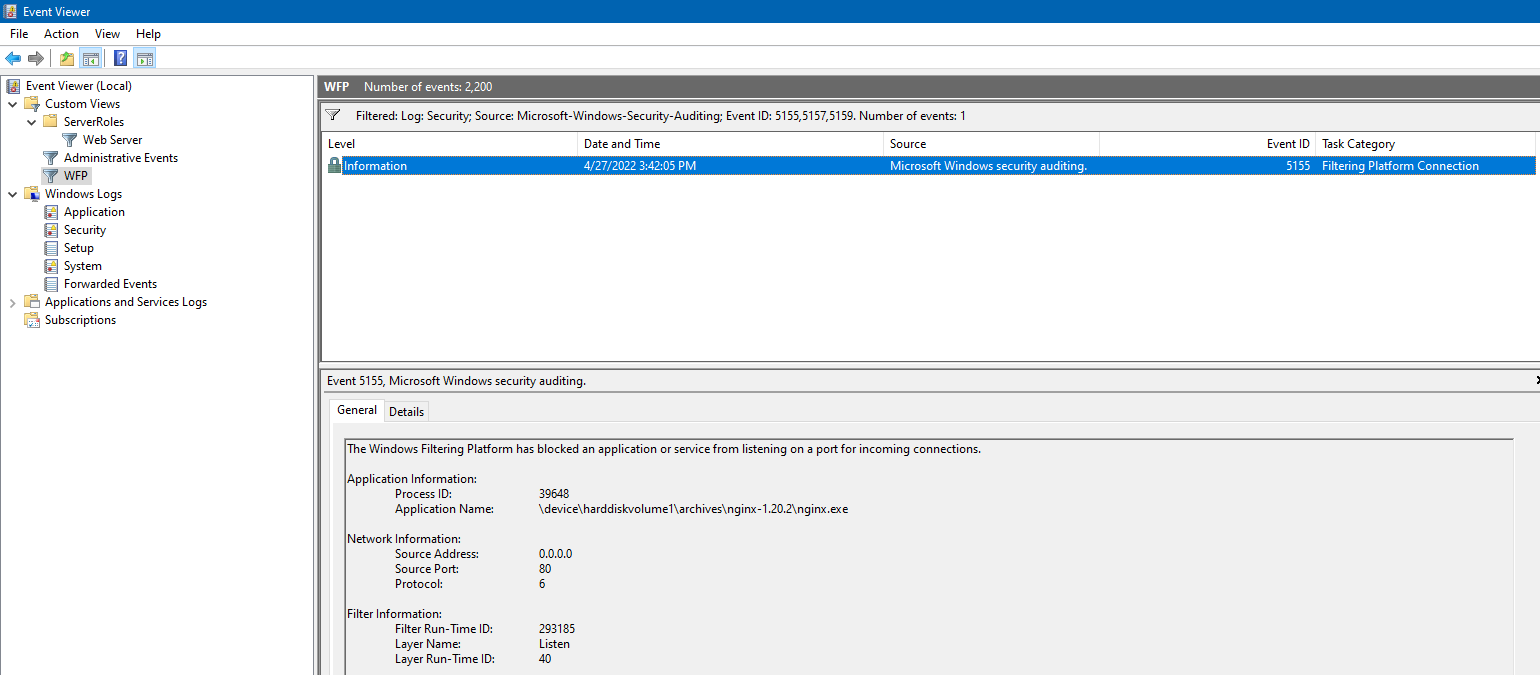
서드파티(비 IIS) HTTP 서버를 사용합니다. 여기서는 기본적으로 80 포트를 수신하는 nginx를 사용합니다. 더블클릭으로 시작하면 5155 이벤트가 발생합니다.
-
필터를 복원합니다.
.\WFPSampler.exe -clean -
감사 스위치를 복원합니다.
auditpol /set /category:"{0CCE9226-69AE-11D9-BED3-505054503030}" /success:disable /failure:disable
# 5155 blocked an application or service from listening on a port for incoming connections
.\WFPSampler.exe -s BASIC_ACTION_BLOCK -l FWPM_LAYER_ALE_AUTH_LISTEN_V4
# 5157 blocked a connection
.\WFPSampler.exe -s BASIC_ACTION_BLOCK -l FWPM_LAYER_ALE_AUTH_RECV_ACCEPT_V4
.\WFPSampler.exe -s BASIC_ACTION_BLOCK -l FWPM_LAYER_ALE_AUTH_CONNECT_V4
# 5159, blocked a bind to a local port
.\WFPSampler.exe -s BASIC_ACTION_BLOCK -l FWPM_LAYER_ALE_RESOURCE_ASSIGNMENT_V4

# Other
.\WFPSampler.exe -s BASIC_ACTION_BLOCK -l FWPM_LAYER_ALE_RESOURCE_ASSIGNMENT_V4_DISCARD
.\WFPSampler.exe -s BASIC_ACTION_BLOCK -l FWPM_LAYER_ALE_AUTH_RECV_ACCEPT_V4_DISCARD
.\WFPSampler.exe -s BASIC_ACTION_BLOCK -l FWPM_LAYER_ALE_AUTH_CONNECT_V4_DISCARD

# To find a specific Windows Filtering Platform filter by ID, run the following command:
netsh wfp show filters
# To find a specific Windows Filtering Platform layer ID, you need to execute the following command:
netsh wfp show state
네트워크 이벤트(NET_EVENT) 모니터링
- 네트워크 이벤트는 열거 조회와 구독을 지원합니다.
- 열거 방식은 맞춤형 필터 조건을 지원하며, 특정 기간의 네트워크 이벤트를 가져올 수 있습니다.
- 구독 방식은 콜백 함수를 주입하여 실시간으로 피드백을 제공할 수 있습니다.
지원되는 이벤트 종류:
typedef enum FWPM_NET_EVENT_TYPE_ {
  FWPM_NET_EVENT_TYPE_IKEEXT_MM_FAILURE = 0,
  FWPM_NET_EVENT_TYPE_IKEEXT_QM_FAILURE,
  FWPM_NET_EVENT_TYPE_IKEEXT_EM_FAILURE,
  FWPM_NET_EVENT_TYPE_CLASSIFY_DROP,
  FWPM_NET_EVENT_TYPE_IPSEC_KERNEL_DROP,
  FWPM_NET_EVENT_TYPE_IPSEC_DOSP_DROP,
  FWPM_NET_EVENT_TYPE_CLASSIFY_ALLOW,
  FWPM_NET_EVENT_TYPE_CAPABILITY_DROP,
  FWPM_NET_EVENT_TYPE_CAPABILITY_ALLOW,
  FWPM_NET_EVENT_TYPE_CLASSIFY_DROP_MAC,
  FWPM_NET_EVENT_TYPE_LPM_PACKET_ARRIVAL,
  FWPM_NET_EVENT_TYPE_MAX
} FWPM_NET_EVENT_TYPE;
지원되는 필터 조건(FWPM_NET_EVENT_ENUM_TEMPLATE):
| Value | Meaning |
|---|---|
| FWPM_CONDITION_IP_PROTOCOL | RFC 1700에 명시된 IP 프로토콜 번호. |
| FWPM_CONDITION_IP_LOCAL_ADDRESS | 로컬 IP 주소. |
| FWPM_CONDITION_IP_REMOTE_ADDRESS | 원격 IP 주소. |
| FWPM_CONDITION_IP_LOCAL_PORT | 로컬 전송 프로토콜 포트 번호. ICMP의 경우 메시지 타입. |
| FWPM_CONDITION_IP_REMOTE_PORT | 원격 전송 프로토콜 포트 번호. ICMP의 경우 메시지 코드. |
| FWPM_CONDITION_SCOPE_ID | 인터페이스 IPv6 범위 식별자. 내부 사용을 위해 예약됨. |
| FWPM_CONDITION_ALE_APP_ID | 애플리케이션의 전체 경로. |
| FWPM_CONDITION_ALE_USER_ID | 로컬 사용자 식별. |
드라이버가 아닌 호출 방식은 일반적인 drop 이벤트만 얻을 수 있습니다.
네트워크 연결(NetConnection) 모니터링
네트워크 이벤트 모니터링에 비해 네트워크 연결 모니터링은 더 높은 권한이 필요합니다. callback 방식
The caller needs FWPM_ACTRL_ENUM access to the connection objects’ containers and FWPM_ACTRL_READ access to the connection objects. See Access Control for more information.
현재 네트워크 연결 모니터링에 성공하지 못했습니다.
같은 문제를 찾았습니다. Receiving in/out traffic stats using WFP user-mode API, 제가 조사 중에 겪은 현상과 같습니다. 구독 함수가 어떤 보고도 받지 못하고, 이벤트를 얻지 못하며, 오류가 없습니다. 누군가는 커널 모드가 아닌 경우 drop 이벤트 보고만 받을 수 있다고 언급했습니다. 이는 차단 이벤트를 얻는 요구를 만족시킬 수 없습니다.
보안 설명자 추가 예시: https://docs.microsoft.com/en-us/windows/win32/fwp/reserving-ports
Application Layer Enforcement(ALE) 소개
- ALE은 커널 모드에서 작동하는 일련의 필터를 포함하며, 상태 필터링을 지원합니다.
- ALE 레이어의 필터는 연결 생성, 포트 할당, 소켓 관리, 원시 소켓 생성 및 프로미스키터스 모드 수신을 승인할 수 있습니다.
- ALE 레이어 필터는 연결(connection) 또는 소켓(socket) 기반이며, 다른 레이어의 필터는 패킷(packet) 기반으로만 분류할 수 있습니다.
- ALE 필터 참조 ale-layers
- 더 많은 필터 참조 filtering-layer-identifiers
코딩
대부분의 WFP 함수는 사용자 모드와 커널 모드 모두에서 호출할 수 있습니다. 그러나 사용자 모드 함수는 Win32 오류 코드를 나타내는 DWORD 값을 반환하고, 커널 모드 함수는 NT 상태 코드를 나타내는 NTSTATUS 값을 반환합니다. 따라서 함수 이름과 의미는 사용자 모드와 커널 모드 사이에서 동일하지만 함수 시그니처는 다릅니다. 이는 함수 원형에 대한 별도의 사용자 모드와 커널 모드 고유 헤더가 필요함을 의미합니다. 사용자 모드 헤더 파일 이름은 “u"로 끝나고, 커널 모드 헤더 파일 이름은 “k"로 끝납니다.
결론
요구사항은 이벤트 발생만을 인식하면 되며 즉시 이벤트를 처리할 필요는 없습니다. 또한 드라이버 개발은 더 큰 위험을 가져오므로 감사 이벤트를 사용하여 로그 레코드 이벤트를 모니터링하는 방식으로 차단 이벤트를 얻기로 결정했습니다. 새로운 스레드를 생성하여 NotifyChangeEventLog를 사용하여 로그 레코드 이벤트를 모니터링합니다.
부록
WFP 아키텍처
WFP(Windows Filter Platform) 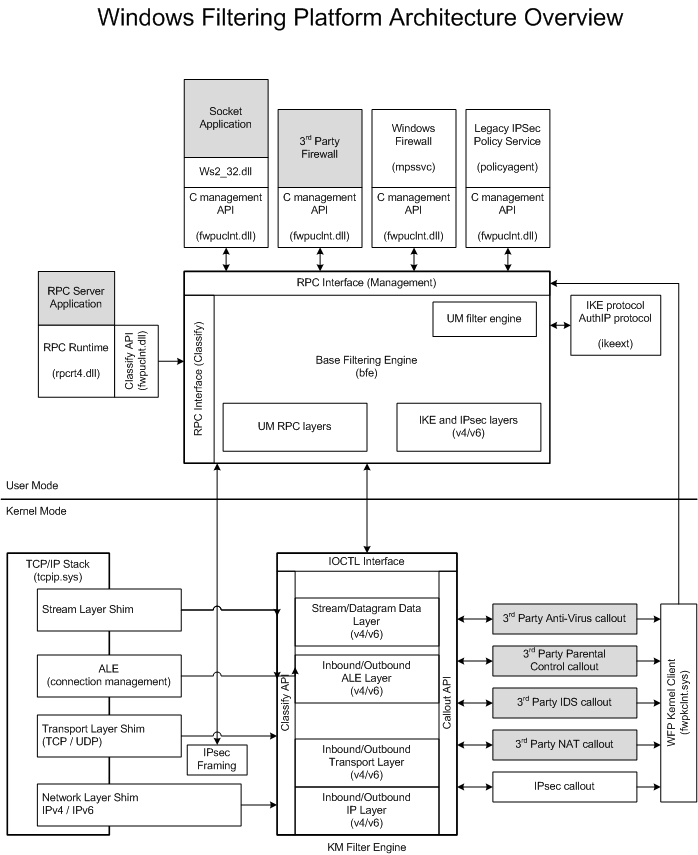
데이터 흐름
데이터 흐름:
- 패킷이 네트워크 스택으로 들어옵니다.
- 네트워크 스택이 쉼을 찾고 호출합니다.
- 쉼이 특정 레이어에서 분류 프로세스를 호출합니다.
- 분류 중에 필터가 일치하고 결과 액션이 수행됩니다. (필터 중재 참조.)
- 분류 프로세스에서 콜아웃 필터가 일치하면 해당 콜아웃이 호출됩니다.
- 쉼이 최종 필터링 결정에 따라 행동합니다(예: 패킷 삭제).