Windows阻斷網路流量取得
Categories:
- Windows阻斷網路流量取得
Windows 阻斷網路流量取得
- 需要識別出被阻斷的流量, 被阻斷的流量包括出站入站方向.
- 阻斷的兩種形式, 基於連結(connection), 和基於數據包(packet). 數據包的丟棄較為頻繁常見, 需要審查丟棄原因, 基於連結的阻斷更符合實際需關注的阻斷場景.
- 許多正常處理的報文也會被 drop, 因此需要區分 drop 和 block 行為, 我們主要關注 block 的情況.
搭建測試工程
WFP 主要工作在 usermode, 另一部分在 kernalmode, 能力以驅動形式體現, 搭建測試環境的方法比較複雜. 推薦的方法是測試機使用另一台實體機, 開發機編譯好後, 發送至測試機遠端調試. 受條件限制, 我們也可以直接在本地進行調試.
- Microsoft WFP Sample 工程
- 只關注: Windows-driver-samples\network\trans\WFPSampler
- WFPSampler 工程指導
編譯問題:
其它問題:
透過審核取得 block 事件
預設情況下,禁用對 WFP 的審核。
- 可以透過組策略物件編輯器 MMC 管理單元、本機安全性策略 MMC 管理單元或 auditpol.exe 指令,按類別(category)啟用審核。
- 可以透過 auditpol.exe 指令按子類別(subcategory)啟用審核。
- 應該使用 guid 進行設定, 否則不同語言系統有本地化的問題.
- 審計使用循環日誌, 128KB 不用擔心資源消耗
類別https://docs.microsoft.com/en-us/windows/win32/secauthz/auditing-constants
| Category/Subcategory | GUID |
|---|---|
| … | … |
| Object Access | {6997984A-797A-11D9-BED3-505054503030} |
| Policy Change | {6997984D-797A-11D9-BED3-505054503030} |
| … | … |
Object Access 子類和對應 GUID https://docs.microsoft.com/en-us/openspecs/windows_protocols/ms-gpac/77878370-0712-47cd-997d-b07053429f6d
| Object Access Subcategory | Subcategory GUID | Inclusion Setting |
|---|---|---|
| … | … | … |
| Filtering Platform Packet Drop | {0CCE9225-69AE-11D9-BED3-505054503030} | No Auditing |
| Filtering Platform Connection | {0CCE9226-69AE-11D9-BED3-505054503030} | No Auditing |
| Other Object Access Events | {0CCE9227-69AE-11D9-BED3-505054503030} | No Auditing |
| … | … | … |
Policy Change 子類和對應 GUID:
| Policy Change Subcategory | Subcategory GUID |
|---|---|
| Audit Policy Change | {0CCE922F-69AE-11D9-BED3-505054503030} |
| Authentication Policy Change | {0CCE9230-69AE-11D9-BED3-505054503030} |
| Authorization Policy Change | {0CCE9231-69AE-11D9-BED3-505054503030} |
| MPSSVC Rule-Level Policy Change | {0CCE9232-69AE-11D9-BED3-505054503030} |
| Filtering Platform Policy Change | {0CCE9233-69AE-11D9-BED3-505054503030} |
| Other Policy Change Events | {0CCE9234-69AE-11D9-BED3-505054503030} |
# auditpol手冊參閱: https://docs.microsoft.com/en-us/windows-server/administration/windows-commands/auditpol
# 本段主要關注 'Object Access' 類別
# 取得可查詢的欄位
# -v 顯示GUID, -r顯示csv報告
auditpol /list /category /v
auditpol /list /subcategory:* /v
# 取得某個子類別的審計設定
auditpol /get /category:'Object Access' /r | ConvertFrom-Csv| Get-Member
# 查詢guid
auditpol /get /category:'Object Access' /r | ConvertFrom-Csv| Format-Table Subcategory,'Subcategory GUID','Inclusion Setting'
# 查找subcategory
auditpol /list /subcategory:"Object Access","Policy Change" -v
# 備份
auditpol /backup /file:d:\audit.bak
# 還原
auditpol /restore /file:d:\audit.bak
# 修改Policy
# **Policy Change**    | {6997984D-797A-11D9-BED3-505054503030}
auditpol /set /category:"{6997984D-797A-11D9-BED3-505054503030}" /success:disable /failure:disable
# Filtering Platform Policy Change | {0CCE9233-69AE-11D9-BED3-505054503030}
auditpol /set /subcategory:"{0CCE9233-69AE-11D9-BED3-505054503030}" /success:enable /failure:enable

# **Object Access**    | {6997984A-797A-11D9-BED3-505054503030}
auditpol /get /category:"{6997984A-797A-11D9-BED3-505054503030}"
auditpol /set /category:"{6997984A-797A-11D9-BED3-505054503030}" /success:disable /failure:disable
# Filtering Platform Packet Drop | {0CCE9225-69AE-11D9-BED3-505054503030}
auditpol /set /subcategory:"{0CCE9225-69AE-11D9-BED3-505054503030}" /success:disable /failure:enable
# Filtering Platform Connection  | {0CCE9226-69AE-11D9-BED3-505054503030}
auditpol /set /subcategory:"{0CCE9226-69AE-11D9-BED3-505054503030}" /success:disable /failure:enable
# 讀取日誌
$Events = Get-WinEvent -LogName 'Security'
foreach ($event in $Events) {
    ForEach ($line in $($event.Message -split "`r`n")) {
        Write-host $event.RecordId ':' $Line
        break
    }
}
事件說明:
| Event ID | Explanation |
|---|---|
| 5031(F) | The Windows Firewall Service blocked an application from accepting incoming connections on the network. |
| 5150(-) | The Windows Filtering Platform blocked a packet. |
| 5151(-) | A more restrictive Windows Filtering Platform filter has blocked a packet. |
| 5152(F) | The Windows Filtering Platform blocked a packet. |
| 5153(S) | A more restrictive Windows Filtering Platform filter has blocked a packet. |
| 5154(S) | The Windows Filtering Platform has permitted an application or service to listen on a port for incoming connections. |
| 5155(F) | The Windows Filtering Platform has blocked an application or service from listening on a port for incoming connections. |
| 5156(S) | The Windows Filtering Platform has permitted a connection. |
| 5157(F) | The Windows Filtering Platform has blocked a connection. |
| 5158(S) | The Windows Filtering Platform has permitted a bind to a local port. |
| 5159(F) | The Windows Filtering Platform has blocked a bind to a local port. |
關注的事件詳細說明:
- Audit Filtering Platform Packet Drop
-
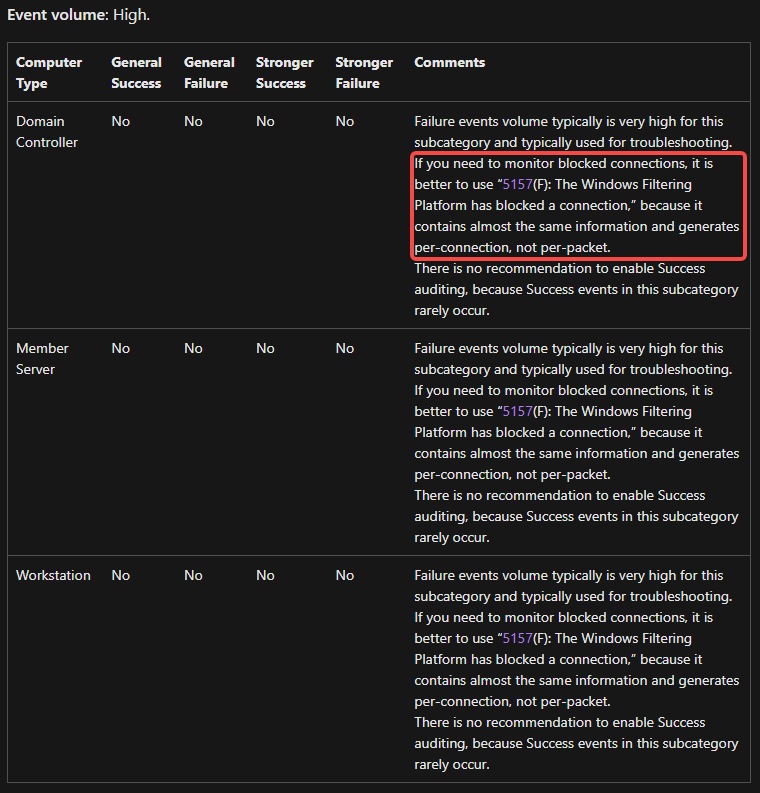
這類事件產生量非常大,建議關注5157事件, 它記錄了幾乎相同的信息, 但是 5157 基於連結記錄而不是基於數據包.
-
Failure events volume typically is very high for this subcategory and typically used for troubleshooting. If you need to monitor blocked connections, it is better to use “5157(F): The Windows Filtering Platform has blocked a connection,” because it contains almost the same information and generates per-connection, not per-packet.
-
- Audit Filtering Platform Connection
取得 provider 資訊
# 取得security相關的provider資訊
Get-WinEvent -ListProvider "*Security*"  | Select-Object providername,id
# Microsoft-Windows-Security-Auditing                             54849625-5478-4994-a5ba-3e3b0328c30d
# 取得provider提供的task資訊
Get-WinEvent -ListProvider "Microsoft-Windows-Security-Auditing"  | Select-Object -ExpandProperty tasks
# SE_ADT_OBJECTACCESS_FIREWALLCONNECTION       12810 Filtering Platform Connection          00000000-0000-0000-0000-000000000000
| ProviderName | Id |
|---|---|
| Security Account Manager | 00000000-0000-0000-0000-000000000000 |
| Security | 00000000-0000-0000-0000-000000000000 |
| SecurityCenter | 00000000-0000-0000-0000-000000000000 |
| Microsoft-Windows-Security-SPP-UX-GenuineCenter-Logging | fb829150-cd7d-44c3-af5b-711a3c31cedc |
| Microsoft-Windows-Security-Mitigations | fae10392-f0af-4ac0-b8ff-9f4d920c3cdf |
| Microsoft-Windows-VerifyHardwareSecurity | f3f53c76-b06d-4f15-b412-61164a0d2b73 |
| Microsoft-Windows-SecurityMitigationsBroker | ea8cd8a5-78ff-4418-b292-aadc6a7181df |
| Microsoft-Windows-Security-Adminless | ea216962-877b-5b73-f7c5-8aef5375959e |
| Microsoft-Windows-Security-Vault | e6c92fb8-89d7-4d1f-be46-d56e59804783 |
| Microsoft-Windows-Security-Netlogon | e5ba83f6-07d0-46b1-8bc7-7e669a1d31dc |
| Microsoft-Windows-Security-SPP | e23b33b0-c8c9-472c-a5f9-f2bdfea0f156 |
| Microsoft-Windows-Windows Firewall With Advanced Security | d1bc9aff-2abf-4d71-9146-ecb2a986eb85 |
| Microsoft-Windows-Security-SPP-UX-Notifications | c4efc9bb-2570-4821-8923-1bad317d2d4b |
| Microsoft-Windows-Security-SPP-UX-GC | bbbdd6a3-f35e-449b-a471-4d830c8eda1f |
| Microsoft-Windows-Security-Kerberos | 98e6cfcb-ee0a-41e0-a57b-622d4e1b30b1 |
| Microsoft-Windows-Security-ExchangeActiveSyncProvisioning | 9249d0d0-f034-402f-a29b-92fa8853d9f3 |
| Microsoft-Windows-NetworkSecurity | 7b702970-90bc-4584-8b20-c0799086ee5a |
| Microsoft-Windows-Security-SPP-UX | 6bdadc96-673e-468c-9f5b-f382f95b2832 |
| Microsoft-Windows-Security-Auditing | 54849625-5478-4994-a5ba-3e3b0328c30d |
| Microsoft-Windows-Security-LessPrivilegedAppContainer | 45eec9e5-4a1b-5446-7ad8-a4ab1313c437 |
| Microsoft-Windows-Security-UserConsentVerifier | 40783728-8921-45d0-b231-919037b4b4fd |
| Microsoft-Windows-Security-IdentityListener | 3c6c422b-019b-4f48-b67b-f79a3fa8b4ed |
| Microsoft-Windows-Security-EnterpriseData-FileRevocationManager | 2cd58181-0bb6-463e-828a-056ff837f966 |
| Microsoft-Windows-Security-Audit-Configuration-Client | 08466062-aed4-4834-8b04-cddb414504e5 |
| Microsoft-Windows-Security-IdentityStore | 00b7e1df-b469-4c69-9c41-53a6576e3dad |
構造 block 事件
必須非常注意,在構造 block 事件時, 會影響本地其它軟體的運行!
可及時使用.\WFPSampler.exe -clean來清理過濾器.
操作步驟:
-
打開 Filtering Platform Connection 的審核開關,
auditpol /set /subcategory:"{0CCE9226-69AE-11D9-BED3-505054503030}" /success:enable /failure:enable -
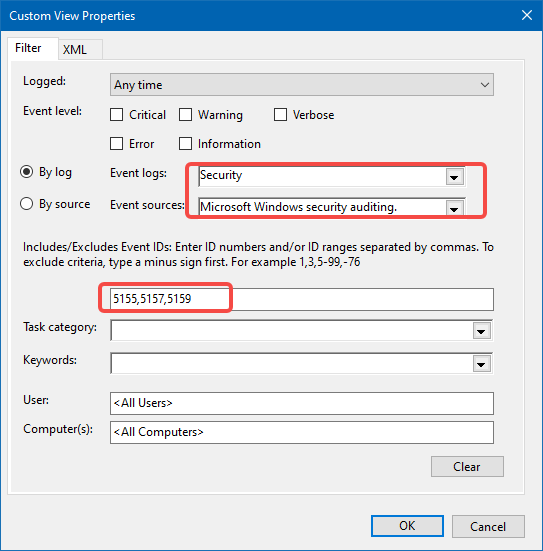
打開 Event Viewer, 構造一個 Custom View, 創建過濾器, 我們暫只關注 5155, 5157, 5159 三個事件.
-
構造一個過濾器, 我們使用WFPSampler.exe來構造過濾器, 阻止監聽本地的80端口,
.\WFPSampler.exe -s BASIC_ACTION_BLOCK -l FWPM_LAYER_ALE_AUTH_LISTEN_V4 -iplp 80 -
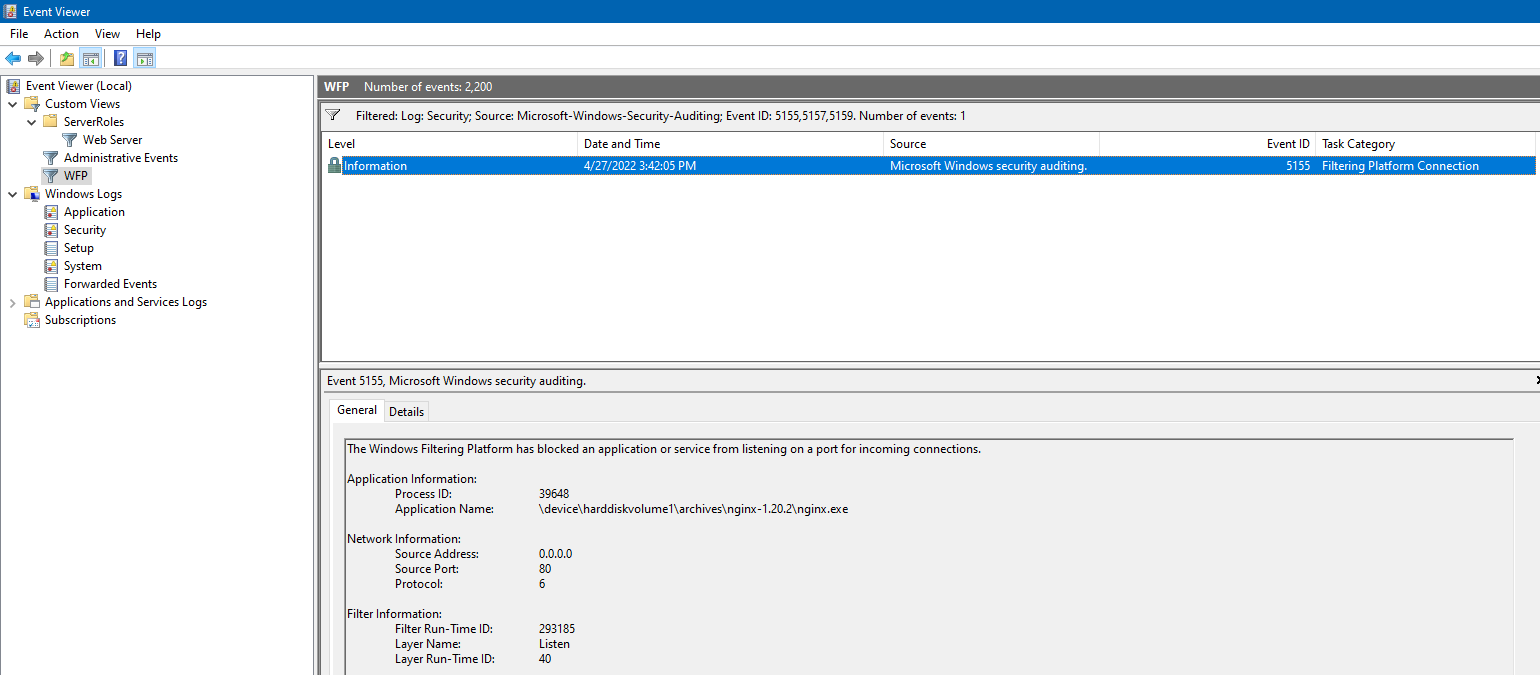
使用一個第三方(非 IIS)的 http server, 這裡使用的 nginx, 預設監聽 80 端口, 雙擊啟動啟動則觸發 5155 事件
-
還原過濾器,
.\WFPSampler.exe -clean -
還原審核開關,
auditpol /set /category:"{0CCE9226-69AE-11D9-BED3-505054503030}" /success:disable /failure:disable
# 5155 blocked an application or service from listening on a port for incoming connections
.\WFPSampler.exe -s BASIC_ACTION_BLOCK -l FWPM_LAYER_ALE_AUTH_LISTEN_V4
# 5157 blocked a connection
.\WFPSampler.exe -s BASIC_ACTION_BLOCK -l FWPM_LAYER_ALE_AUTH_RECV_ACCEPT_V4
.\WFPSampler.exe -s BASIC_ACTION_BLOCK -l FWPM_LAYER_ALE_AUTH_CONNECT_V4
# 5159, blocked a bind to a local port
.\WFPSampler.exe -s BASIC_ACTION_BLOCK -l FWPM_LAYER_ALE_RESOURCE_ASSIGNMENT_V4

# Other
.\WFPSampler.exe -s BASIC_ACTION_BLOCK -l FWPM_LAYER_ALE_RESOURCE_ASSIGNMENT_V4_DISCARD
.\WFPSampler.exe -s BASIC_ACTION_BLOCK -l FWPM_LAYER_ALE_AUTH_RECV_ACCEPT_V4_DISCARD
.\WFPSampler.exe -s BASIC_ACTION_BLOCK -l FWPM_LAYER_ALE_AUTH_CONNECT_V4_DISCARD

# To find a specific Windows Filtering Platform filter by ID, run the following command:
netsh wfp show filters
# To find a specific Windows Filtering Platform layer ID, you need to execute the following command:
netsh wfp show state
監控網路事件(NET_EVENT)
- 網路事件支援枚舉查找, 支援訂閱.
- 枚舉方式支援定制過濾條件, 取得一段時間內的網路事件.
- 訂閱方式可以注入一個 callback 函數, 實時回饋.
支援的事件種類:
typedef enum FWPM_NET_EVENT_TYPE_ {
  FWPM_NET_EVENT_TYPE_IKEEXT_MM_FAILURE = 0,
  FWPM_NET_EVENT_TYPE_IKEEXT_QM_FAILURE,
  FWPM_NET_EVENT_TYPE_IKEEXT_EM_FAILURE,
  FWPM_NET_EVENT_TYPE_CLASSIFY_DROP,
  FWPM_NET_EVENT_TYPE_IPSEC_KERNEL_DROP,
  FWPM_NET_EVENT_TYPE_IPSEC_DOSP_DROP,
  FWPM_NET_EVENT_TYPE_CLASSIFY_ALLOW,
  FWPM_NET_EVENT_TYPE_CAPABILITY_DROP,
  FWPM_NET_EVENT_TYPE_CAPABILITY_ALLOW,
  FWPM_NET_EVENT_TYPE_CLASSIFY_DROP_MAC,
  FWPM_NET_EVENT_TYPE_LPM_PACKET_ARRIVAL,
  FWPM_NET_EVENT_TYPE_MAX
} FWPM_NET_EVENT_TYPE;
支援的過濾條件(FWPM_NET_EVENT_ENUM_TEMPLATE):
| Value | Meaning |
|---|---|
| FWPM_CONDITION_IP_PROTOCOL | The IP protocol number, as specified in RFC 1700. |
| FWPM_CONDITION_IP_LOCAL_ADDRESS | The local IP address. |
| FWPM_CONDITION_IP_REMOTE_ADDRESS | The remote IP address. |
| FWPM_CONDITION_IP_LOCAL_PORT | The local transport protocol port number. For ICMP, the message type. |
| FWPM_CONDITION_IP_REMOTE_PORT | The remote transport protocol port number. For ICMP, the message code. |
| FWPM_CONDITION_SCOPE_ID | The interface IPv6 scope identifier. Reserved for internal use. |
| FWPM_CONDITION_ALE_APP_ID | The full path of the application. |
| FWPM_CONDITION_ALE_USER_ID | The identification of the local user. |
非 driver 呼叫的方式只能獲得普通的 drop 事件.
監控網路連結(NetConnection)
較監控網路事件, 監控連結需要更高權限. callback 方式
The caller needs FWPM_ACTRL_ENUM access to the connection objects’ containers and FWPM_ACTRL_READ access to the connection objects. See Access Control for more information.
暫未能成功監控網路連結.
查到同樣問題, Receiving in/out traffic stats using WFP user-mode API, 和我調研中遇到的現象一樣, 訂閱函數收不到任何上報, 得不到任何事件, 沒有報錯. 開審計, 提權都沒有成功. 有人提示非核心模式只能得到 drop 事件的上報, 這不能滿足取得阻斷事件的需求.
添加 security descriptor 示例: https://docs.microsoft.com/en-us/windows/win32/fwp/reserving-ports
Application Layer Enforcement(ALE)介紹
- ALE 包含一系列在核心模式下的過濾器, 支援狀態過濾.
- ALE 層的過濾器可授權連結的創建, 端口分配, 套接字管理, 原始套接字創建, 和混雜模式接收.
- ALE 層過濾器的分類基於連結(connection), 或基於套接字(socket), 其它層的過濾器只能基於數據包(packet)進行分類.
- ALE 過濾器參考 ale-layers
- 更多過濾器參考 filtering-layer-identifiers
編碼
大多數 WFP 函數都可以從使用者模式或核心模式呼叫。 但是,使用者模式函數返回表示 Win32 錯誤代碼的 DWORD 值,而核心模式函數返回表示 NT 狀態代碼的 NTSTATUS 值。 因此,函數名稱和語義在使用者模式和核心模式之間是相同的,但函數簽名則不同。 這需要函數原型的單獨使用者模式和核心模式特定標頭。 使用者模式標頭檔名以"u"結尾,核心模式標頭檔名以"k"結尾。
結論
需求僅需要知道事件發生, 不需要即時處理事件, 另外開發驅動會帶來更大的風險, 因此決定使用事件審計, 監控日誌產生事件的方式來獲得阻斷事件.
新開一個執行緒來使用NotifyChangeEventLog來監控日誌記錄事件.
附錄
WFP 體系結構
WFP(Windows Filter Platform) 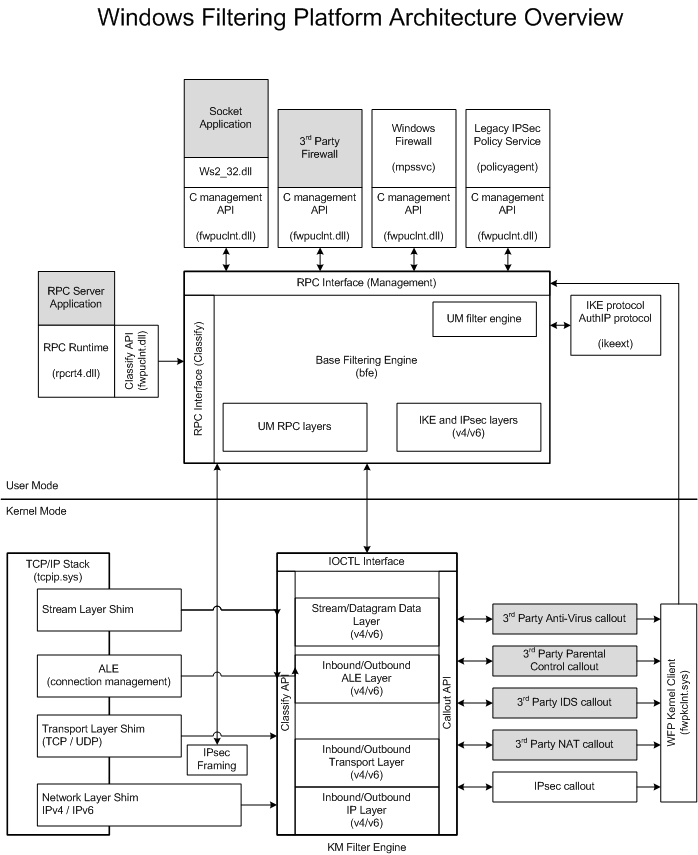
資料流
Data flow:
- A packet comes into the network stack.
- The network stack finds and calls a shim.
- The shim invokes the classification process at a particular layer.
- During classification, filters are matched and the resultant action is taken. (See Filter Arbitration.)
- If any callout filters are matched during the classification process, the corresponding callouts are invoked.
- The shim acts on the final filtering decision (for example, drop the packet).